Sectigo CaaS Operation Guide

This article mainly provides operation instructions after purchasing the Sectigo CaaS service.


Activate the Product

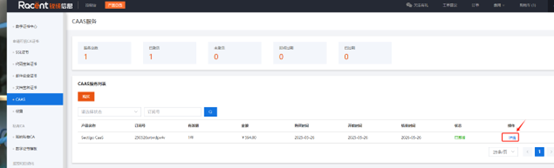
  1. After purchasing the CAAS service, go to SSL Certificates.

  2. Select to enter the CAAS page.

  3. Select the purchased product and click Activate.

  4. After activation, click the Details option to the right of the product.

    caasguide


Add Domains for Certificate Requests

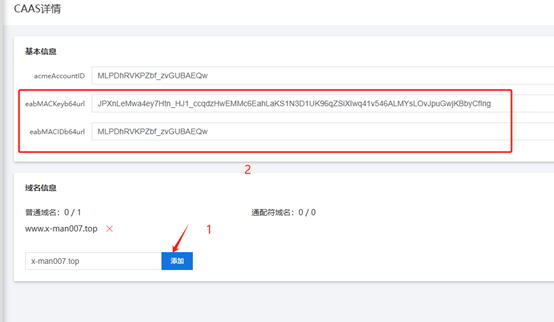
  1. After entering the CaaS details page, you can see ID and MACKey in the image below. Add the domains for which you need to request certificates in the domain information section.

    caasguide


Install the ACME Tool

Install the ACME tool on the client side. Here we take certbot as an example.

  1. Install certbot (operating system: ubuntu22.04)

    apt install certbot python3-certbot-nginx
  2. Use eabMACID and eabMACKey in certbot

    certbot certonly --webroot -w /var/www/html #Web root directory

    --server https://acme.sectigo.com/v2/DV #Sectigo ACME server address

    --eab-kid "MLPDhRVKPZbf_zvGUBAEQw" #Value of eabMACIDb64url

    --eab-hmac-key "JPXnLeMwa4ey7Htn_HJ1_ccqdzHwEMMc6EahLaKS1N3D1UK96qZSiXIwq41v546ALMYsLOvJpuGwjKBbyCfIng" #Value of eabMACKeyb64url

    -d x-man007.top -d www.x-man007.top #Domains for which certificates need to be requested

    • /var/www/html
    • "MLPDhRVKPZbf_zvGUBAEQw"
    • "JPXnLeMwa4ey7Htn_HJ1_ccqdzHwEMMc6EahLaKS1N3D1UK96qZSiXIwq41v546ALMYsLOvJpuGwjKBbyCfIng"
    • x-man007.top
    • www.x-man007.top

    Some of these parameters need to be filled in according to the actual situation.

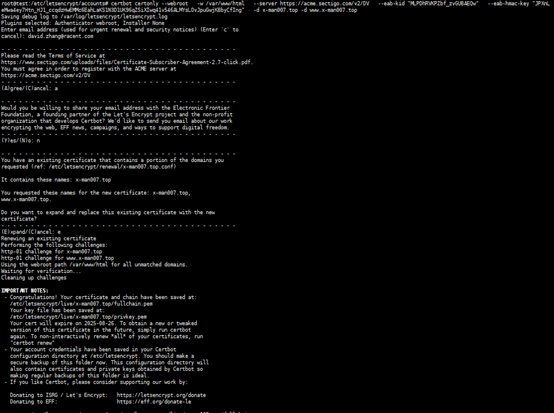
  3. Wait for the certificate request to process after executing the command.

    caasguide

  4. After the certificate request is successful, you can find the issued certificate in /etc/letsencrypt/live/x-man007.top/.


Possible issues you may encounter

If Certbot fails to issue the certificate, it will return an error prompt. You can fix the problem according to the prompt and apply again.

You can also go to /var/log/letsencrypt/letsencrypt.log to view detailed logs.

If the certificate application keeps getting stuck and cannot be issued, you can try to clear the previous ACME account first and then apply again. The specific method is as follows:

  1. Go to /etc/letsencrypt/accounts/ and rename acme.sectigo.com to acme.sectigo.combak
  2. Re-run the certbot command to apply again (refer to Step 3 for the command)