SignTool Command Line Tool Usage Guide
SignTool is the command-line client for sslTrus remote code signing service, used to perform code signing operations in terminals or automated scripts.
Quick Start
Below is a basic signing command example. You can copy it and modify it according to the comments before use:
# 视情况而定,是否需要开启调试模式
#export DEBUG=1

# 使用环境变量配置 AK、SK 以及证书订阅号
export SIGNTOOL_ACCESS_KEY='' SIGNTOOL_ACCESS_SECRET='' SIGNTOOL_CERT_CODE=''

# 签名
./signtool sign \
  --dry-run \
  --access-key=$SIGNTOOL_ACCESS_KEY \
  --access-secret=$SIGNTOOL_ACCESS_SECRET \
  --cert-code=$SIGNTOOL_CERT_CODE \
  --file=app-unsigned.exe \
  --out=app.exe \
  --sha1=false \
  --sha2=true \
  --timestamp-rfc3161 http://timestamp.acs.microsoft.com
Command Details
Before you begin, you need to prepare the following three pieces of information:
Viewing Help
Use the -h or --help parameter to view the full command help.
./signtool sign -h
Core Parameter Reference
| Parameter | Abbreviation | Required | Description & Example |
|---|---|---|---|
| --access-key | -k | Yes | API access key. Can also be set via the SIGNTOOL_ACCESS_KEY environment variable. |
| --access-secret | -s | Yes | API access secret. Can also be set via the SIGNTOOL_ACCESS_SECRET environment variable. |
| --cert-code | -c | Yes | Subscription code for the remote code signing service, used to specify the signing certificate and billing. |
| --file | -f | Yes | Path to the file to be signed. Example: -f "app.dll". |
| --out | -o | No | Path for the output file. By default, .signed is appended to the original file name. Important: The operation will fail if the file already exists. |
| --override | No | Whether to overwrite the path of the file to be signed. Defaults to false. | |
| --sha1 | -1 | No | Enable signing with the SHA1 algorithm (for legacy system compatibility). |
| --sha2 | -2 | No | Enable signing with the SHA256 algorithm (modern standard, recommended). |
| --nest | No | Whether to use nested signing. When the file already has a signature, --nest=true (default) preserves the original signature and adds a new one; false clears the old signature. Comparison of effects: 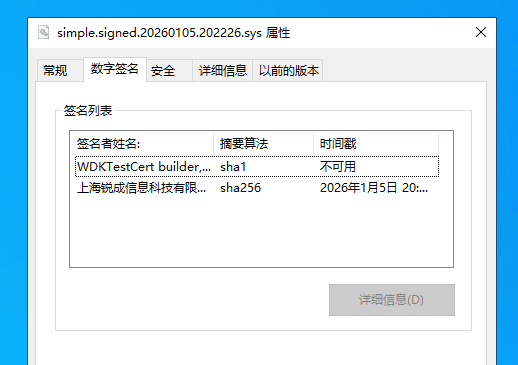 | |
| --timestamp | No | Timestamp server URL used for SHA1 signing. Set to an empty string "" to disable. | |
| --timestamp-rfc3161 | No | RFC 3161 timestamp server URL used for SHA256 signing. Set to an empty string "" to disable. | |
| --desc | -n | No | Program description. This information is embedded in the signature and may be displayed in system security prompts, as shown below: 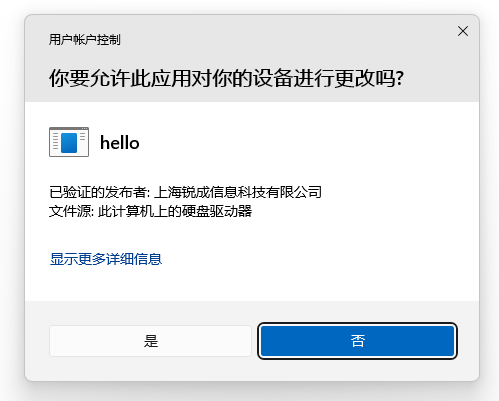 |
| --url | -u | No | Official information link for the program. |
| --verify | No | Verify the file signature immediately after signing. | |
| --dry-run | No | Trial mode. In this mode, a self-signed certificate is used to verify the signing workflow, and the access key and subscription code can be filled in arbitrarily. |
About Boolean Parameters
For parameters that accept true/false values (such as --sha1, --nest), you must use the parameter=value format; space separation is not supported.
- Correct: --sha1=true --sha2=false
- Incorrect: --sha1 true --sha2 false