Detailed Explanation of NS Records

What is an NS Record

NS records are used to specify the authoritative DNS servers for a domain.
For example:
Pointing www.example.com to a.racent.com indicates that the resolution of www.example.com is managed by a.racent.com.

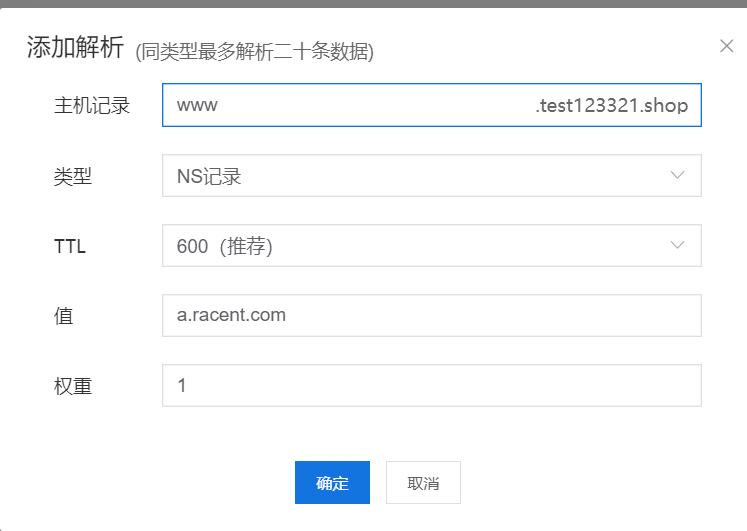
Adding an NS Record

Add NS record

Host Record:

  • @ represents the root domain (e.g., example.com)

  • www represents www.example.com

  • Other specific subdomains

Type: Select NS record

TTL: 600 seconds (recommended)

Value: Enter the domain name of the DNS resolution server (e.g., a.racent.com)

Weight: If there are no special requirements, you can uniformly enter 1.

TTL
  • TTL is the time-to-live for DNS records in the cache of recursive DNS servers.

  • The unit is seconds. A shorter TTL means DNS changes take effect faster; a longer TTL results in a higher cache hit rate and more stable resolution speed.

  • 600 seconds (10 minutes) is a common compromise value that balances flexibility and stability.

Weight

A higher weight value means a higher proportion of traffic will be assigned to it. This only takes effect among records of the same type.

Notes

1. A valid domain name must be used as the NS

  • Do not enter an IP address directly; you must fill in a complete domain name, such as ns1.example.com

2. It is recommended to configure at least two NS records

  • The standard practice is to set a primary NS and a secondary NS to ensure DNS resolution redundancy and stability.

3. NS domain names must be resolvable

  • The configured NS itself must be accessible; otherwise, domain name resolution will fail.