Configure Alibaba Cloud CDN
Prerequisites
Before starting the configuration, make sure you have completed the following preparations:
- Purchase sslTrus CaaS service: Complete the CaaS subscription purchase first. For detailed purchase instructions, see sslTrus CaaS Purchase Guide.
- Apply for an SSL certificate: Make sure you have successfully applied for and issued a certificate. For detailed application procedures, see sslTrus CaaS certificate request.
Configure Alibaba Cloud CDN management interface
Prerequisites
Prepare the AccessKey of the Alibaba Cloud account used to manage CDN in advance.
Required permissions for CDN:
DescribeDomainCertificateInfoSetCdnDomainSSLCertificateDescribeUserDomains
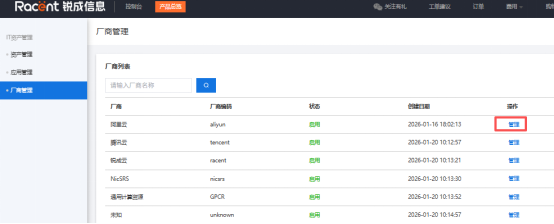
- Go to Console - Asset Management - Vendor Management, select Alibaba Cloud, and click Manage.

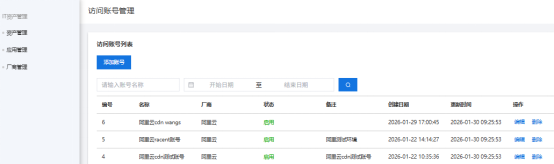
- Click Add Account.

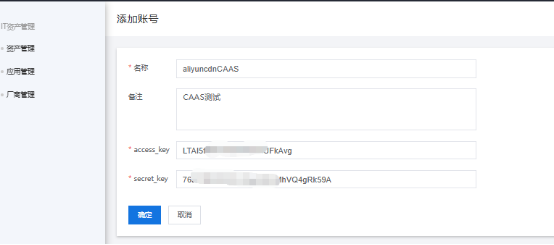
- Enter the account name,
access_keyandsecret_keyfor the Alibaba Cloud CDN management account, then clickSave.

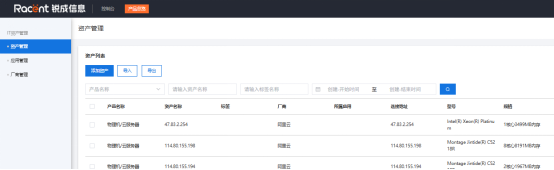
- Go to
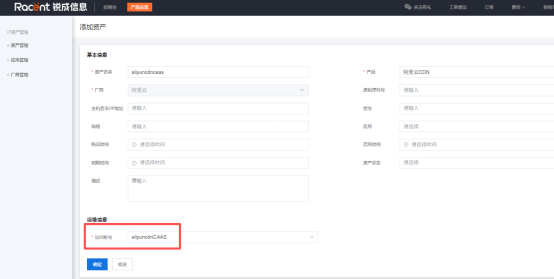
Asset Managementand clickAdd Asset.

- Enter the asset name, select Alibaba Cloud CDN, choose the account you just created, and save.

Configure CaaS
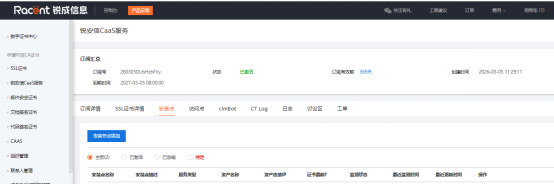
- Go to Console - sslTrus CaaS Service, select the corresponding service and click Details to enter the CaaS management backend.

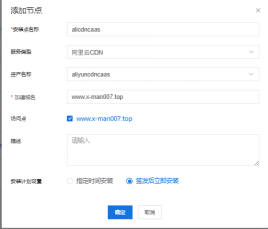
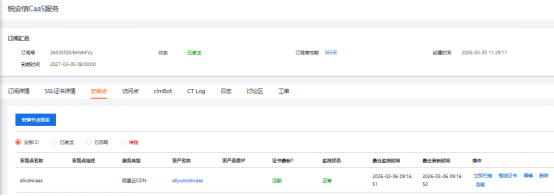
- Switch to the installation point tab, click Add Installation Node, enter the node name, select Alibaba Cloud CDN as the service type, select the asset created in the previous step as the asset name, enter the domain name, and click OK to save.

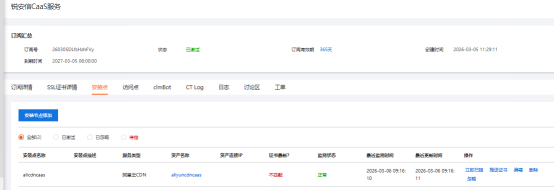
- After configuration, you can manage the node. Click Scan Now to start monitoring the node.

- After a new certificate is issued, click Push Certificate, and the system will push the new certificate to Alibaba Cloud CDN. You can see the certificate is updated to the latest version in backend monitoring.