Sectigo CaaS Operation Guide
This article mainly provides operation instructions after purchasing Sectigo CaaS services.
Activating the Product
-
After purchasing the CaaS service, go to SSL Certificates
-
Select and enter the CaaS page
-
Choose the purchased product and click Activate.
-
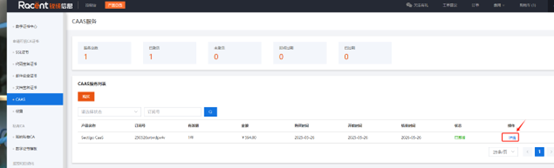
After activation, click the Details option on the right side of the product
Adding the Domain to be Requested
-
After entering the CaaS details page, you can see
IDandMACKeyin the image below. Add the domain for which you need to request a certificate in the Domain Information section.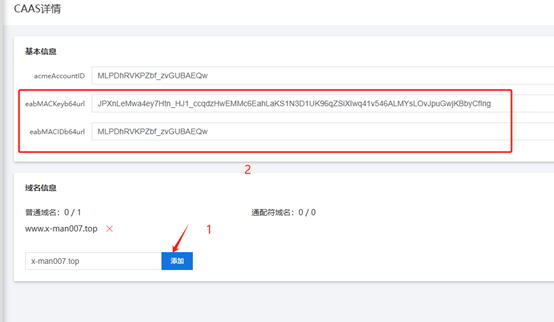
Installing the ACME Tool
Install the ACME tool on the client. Here we use Certbot as an example.
-
Install Certbot (operating system Ubuntu 22.04)
apt install certbot python3-certbot-nginx -
Use
eabMACIDandeabMACKeyin Certbotcertbot certonly --webroot -w /var/www/html #web root directory
--server https://acme.sectigo.com/v2/DV #Sectigo ACME server address
--eab-kid "MLPDhRVKPZbf_zvGUBAEQw" #The value of eabMACIDb64url
--eab-hmac-key "JPXnLeMwa4ey7Htn_HJ1_ccqdzHwEMMc6EahLaKS1N3D1UK96qZSiXIwq41v546ALMYsLOvJpuGwjKBbyCfIng" #The value of eabMACKeyb64url
-d x-man007.top -d www.x-man007.top #The domain for which you need to request a certificate/var/www/html"MLPDhRVKPZbf_zvGUBAEQw""JPXnLeMwa4ey7Htn_HJ1_ccqdzHwEMMc6EahLaKS1N3D1UK96qZSiXIwq41v546ALMYsLOvJpuGwjKBbyCfIng"
x-man007.topwww.x-man007.top
Some of these parameters need to be filled in based on the actual situation.
-
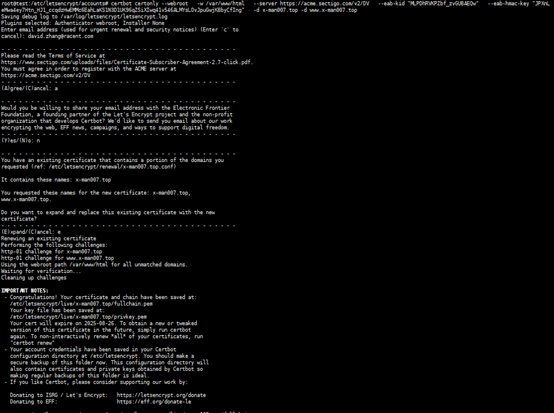
After executing the command, wait for the certificate request.
-
After the certificate request is successful, you can find the issued certificate in
/etc/letsencrypt/live/x-man007.top/.
Possible Issues
If Certbot fails to issue a certificate, it will return an error message. You can fix the issue based on the message and apply again.
You can also check the detailed logs in /var/log/letsencrypt/letsencrypt.log.
If the certificate request keeps getting stuck and cannot be issued, you can try clearing the previous ACME account and applying again. Here's how:
- Go to
/etc/letsencrypt/accounts/, renameacme.sectigo.comtoacme.sectigo.combak - Re-run the certbot command to request again (see the command in step 3)