Download Root Certificate
1. What Is a Root Certificate
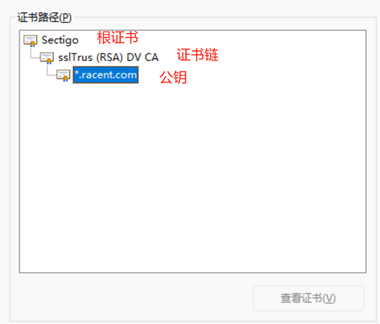
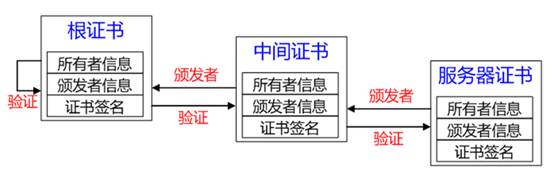
A root certificate is a digital certificate self-signed by a trusted Certificate Authority (CA). Positioned at the top of the certificate chain, it is kept under strict protection by the CA. Root certificates are pre-installed in the trusted root certificate list of browsers; this list is maintained by browsers and operating systems to validate secure connections. Take an sslTrus DV SSL certificate as an example:

2. Purposes of Root Certificates
1. Provides the trust foundation for digital certificates
A root certificate is a self-signed certificate issued by a trusted Certificate Authority (CA), serving as the starting point of the digital certificate trust chain. It is built into the trusted root certificate lists of operating systems and browsers, providing the trust foundation for the entire digital certificate system and ensuring the authenticity and credibility of digital certificates. Without a root certificate, a digital certificate cannot be trusted.
2. Establishes trust with users
Root certificates play a critical role in building trust with users. SSL certificates are installed on servers to enable HTTPS access for websites, while root certificates are pre-installed in major operating systems and browsers to help systems and browsers automatically verify the authenticity and trustworthiness of SSL certificates. This allows users to confirm that a website is secure and safe to visit via the padlock icon or the HTTPS prefix.
3. Ensures authentic and credible identities
Root certificates ensure that identities are authentic and credible. When a user visits a website, the browser checks whether the website's SSL certificate is issued by a trusted CA. If the SSL certificate is issued by a trusted CA, and the root certificate in its certificate chain matches the root certificate built into the browser, the browser will trust the identity of that website.
4. Ensures data confidentiality and integrity
Root certificates ensure data confidentiality and integrity. When data is transmitted between a browser and a website server, the SSL certificate applies HTTPS encryption to the data, preventing any third party from accessing or tampering with the data, safeguarding data confidentiality and maintaining data integrity. The root certificate ensures that encryption starts from a trusted source and validates the entire certificate chain.

3. How to Obtain a Root Certificate
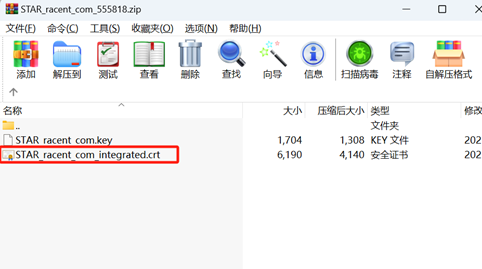
1. The certificate files automatically sent by the CA after certificate issuance include a separate root certificate file
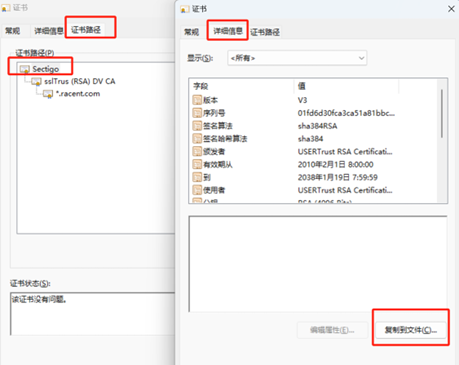
2. Customers can export the root certificate themselves, which requires using the crt file in nginx