SSL Certificate Refund Policy
SSL certificates are subject to unconditional refund rules after an order is placed or issued, and the refund rules vary by brand. This article summarizes the refund policies for SSL certificates from different brands at different stages.
Cancellation time for each brand stage
The following cases qualify for an unconditional refund, and the order can be canceled within the specified time period.
| Brand | Version | Order (Materials Not Submitted) | Issuing | Days After Issuance |
|---|---|---|---|---|
| sslTrus | sslTrus Basic | No time limit | No time limit | 30 days |
| sslTrus Pro | No time limit | No time limit | 7 days | |
| Sectigo | Sectigo | No time limit | No time limit | 30 days |
| PositiveSSL | No time limit | No time limit | 30 days | |
| Digicert | Basic | No time limit | No time limit | 30 days |
| SecureSite | No time limit | No time limit | 30 days | |
| GeoTrust | GeoTrust | No time limit | No time limit | 30 days |
| RapidSSL | No time limit | No time limit | 30 days | |
| Globalsign | Globalsign | No time limit | No time limit | 7 days |
| CFCA | China Root | No time limit | No time limit | 30 days |
| China Root Pro | No time limit | No time limit | 30 days |
How to cancel an order (before submitting materials)?
After placing an order on the Racent platform, orders for which application materials have not yet been submitted can generally be canceled at any time, and the fee will be refunded to the account balance.If you need to cancel such an order, you will need to do so under your account:
- Go to the console
- SSL certificates (note: not the order page)
- Find the order that needs to be canceled
- As shown in the figure, the status displays "Not Submitted"
- Click "Submit Information" to enter the submission page
- Click the "Cancel" button in the bottom-left corner to cancel the order.


If a price adjustment occurs, you may be required to submit information and issue the certificate before the adjustment; otherwise, the request may be automatically cancelled.)
How to cancel orders that are being issued?
After placing an order, you can cancel it at any time during the issuance process after filling in the application materials and submitting it. Generally, there is no time limit, and the fee will be refunded to your account balance.To cancel such orders, you need to operate under your account:
- Enter the console
- SSL certificates (note: not the order page)
- Locate the pending order
- As shown in the figure, the status displays "Pending"
- Click "Details" to enter the certificate details page
- Click the "Cancel Order" button to cancel the order

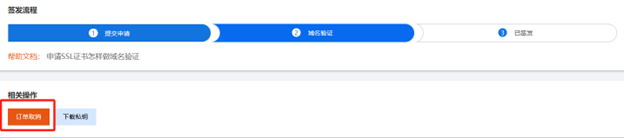
If there is a price adjustment, you may be required to submit the information and get it issued before the adjustment; otherwise, it may be automatically canceled.
How can an order be canceled after issuance?
Once the order is issued, most vendors offer an unconditional refund within a certain period (refer to the Unconditional Refund table), and the fee will be credited back to your account balance.If you need to cancel such an order, you will need to do so under your account:
- Go to the console
- SSL Certificate (Note: not the order page)
- Locate the order that has been issued
- As shown in the figure, the status displays "Issued"
- Click "Details" to enter the certificate details page
- Click the "Cancel Order" button to cancel the order.
 .
.
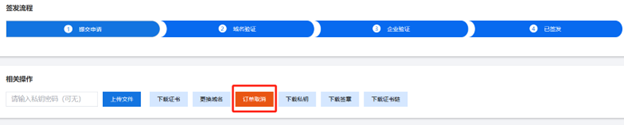
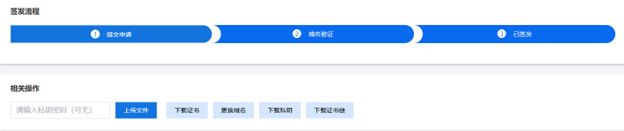
If the certificate has already passed the manufacturer’s specified unconditional refund validity period after issuance, as shown in the figure, the absence of an “Order Cancellation” button on the certificate details page means that this order can no longer be canceled.
:::